Get started — branded portals, live files, and one Link through handover.
Product

For your client

Client portals Project pages

For your company

Invoices Contracts

Explore next-gen client delivery

Client portals Give every client one clear home Project pages Keep status, people, and next steps clear Comments Discuss project work in context Estimates and approvals Review, comment, and approve without another email chain Calendar See projects and delivery windows at a glance
View as Preview exactly what clients and visitors can see Public redactions Hide sensitive details from public pages Access Share publicly or require email sign-in Present mode Present your work in your brand Branded emails Send client updates in your own brand
Solutions

For teams

Studios and agencies Keep every client and project in one clear place Client services teams Share progress without exposing internal tools Consultants and freelancers Give clients a polished home for the work

For your work

Project delivery Keep dates, files, and next steps connected Client communication Discuss decisions where the work lives Estimates and decisions Review and approve without another email chain
Turn your Notion workspace into a clear client experience. See how Link works with Notion ↗
Resources

Learn

What is Notion? See how Notion becomes the working source Help center Find practical guides for using Link FAQ Get quick answers about access, sharing, and setup

Explore

Product overview See the complete client workflow About Link Learn why Link was built Get started Set up your workspace now
Link is designed for teams who want less client-work theatre. Meet the company ↗
Pricing Product
Get started Log in Onboard now
Product Solutions Resources Pricing

Meet Present mode.

A presenter keeps notes on one screen while three remote participants view the same synchronized slide in their browsers and the video call shows faces only.

Start from the project

Open Present mode from the same short Link your client already uses. No deck export or second meeting link.
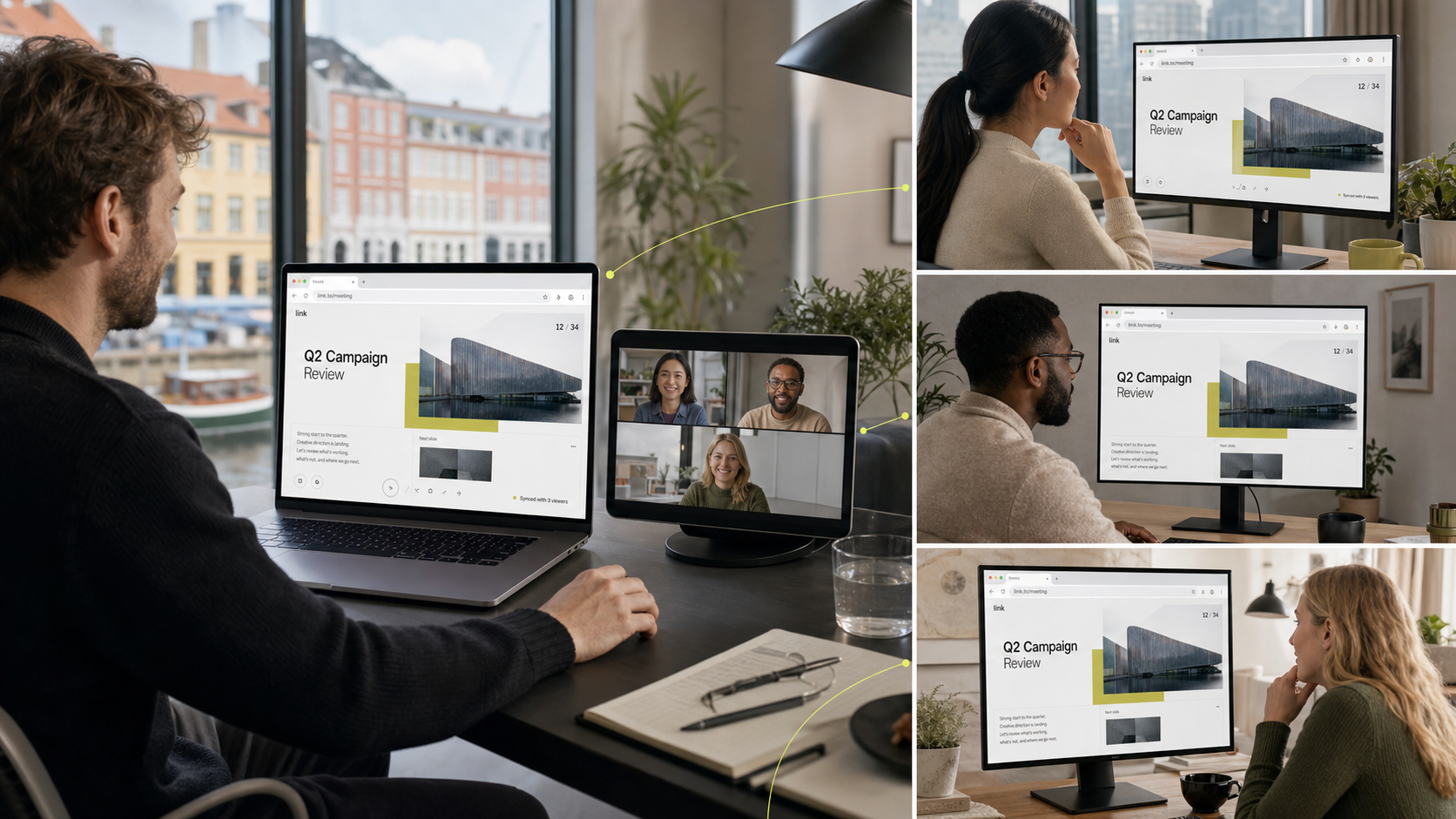
Bring everyone into Sync

Every visitor follows the same slide, even when they join after the presentation starts.

Keep the call human

Keep notes on your screen while the audience gets a clean slide and the video call stays dedicated to conversation.

Present together, from the same Link.

Start from the project your client already has. Everyone follows the same slide while your presenter notes stay with you.

Fashion week dinner using.link/LA27Fw/slides
/ Lumen Atelier's projects with Mireille / Fashion week dinner Public page
June 28 → August 5, 2027

Fashion week dinner

Overview

Produce Mireille’s fashion week dinner in Copenhagen: one considered evening where the collection, the room, and the guest list tell the same story—from the first invitation to the last course.

Run of show

The evening should feel effortless rather than staged—guests arrive to a warm room, the collection is present without being presented, and every transition is handled quietly by the production team.

• A confirmed guest list of forty press, buyers, and friends of the house.
• A venue plan covering arrival flow, seating, lighting, and the collection display.
• A four-course seasonal menu with the caterer, matched to the collection palette.

Next milestone

Lock the venue, menu, and final guest list in one decision so invitations, catering, and staffing can all be confirmed without interpretation gaps.

Approve the venue plan and seating arrangement
Confirm the final menu and wine pairing with the caterer
Sign off the final guest list and send invitations
Lumen Atelier / Mireille
02

A dinner built around one memorable table.

Guests, timing, atmosphere, and every approval stay together in the live project.

‹ 2 / 5 › Syncing

Sync, not screen share

The slide stays sharp.
The conversation stays human.

Each person loads the current slide directly from Link instead of watching a compressed video stream. When the presentation ends, everyone returns to the live project.

Get started
Made for Notion

Product

  • Client portals
  • Project pages
  • Calendar
  • Estimate approvals
  • Comments
  • Access
  • iOS app coming soon

Use cases

  • Studios and agencies
  • Client services teams
  • Consultants
  • Project delivery
  • Client communication
  • Approvals

Resources

  • What is Notion?
  • Product overview
  • Pricing
    • Free
    • Plus
    • Business
    • Enterprise
  • Request a demo ↗
  • Help center
  • FAQ
  • Privacy policy
  • Terms

Company

  • About Link
  • Get started
  • Log in
  • Data deletion

© 2026 Link. Next-gen client management.

0001
Setting up your LinkConnecting your workspaceOrganizing your clients and projectsApplying your brandOpening your portalLoading...